
 | |||
| Image courtesy Pinterest |
If you have ever gone to a bookstore, library, sale etc., bought the book and brought it home only to realize that the same book already sits on your shelf, you are not alone. My problem lies with library books. I'll browse the shelves, wander to a favored author and then can't remember which books I have or haven't read. I read so much that sometimes the titles will jumble together and the publisher's review on the back/inside cover might not always jog my memory if it's been awhile.
Back in January I finally said good-bye to my "dumb-phone" (a flip phone of 6 years) and upgraded to a smart phone. I tried keeping a record of books on the notepad app, but the amount of books I wanted to add just was not feasible without an actual cataloging system. A spreadsheet is nice, but then I wanted to keep track of books read and books owned. The idea of having to frequently print off spreadsheets to carry around did not appeal to me.
After pondering my organizing dilemma I thought, "I bet there's an app for that!" I hit the internet and spent 4 or more hours researching book cataloging applications (yes, keeping track of my books is important to me). Surprisingly there are a good number out there and this site here provides a nice little summary of 7. I looked around Google for personal reviews and of course searched the Google Play store (I have an Android).
After much researching, comparison and deliberation I finally decided on Book Catalogue and do not regret the choice. If I could only have one app on my phone Book Catalogue would be it. Sorry Jelly Splash. What I love most about its features is that you can create numerous "bookshelves" to sort your books and books can go on more than one shelf. For example, I created a "Books Read" and "My Books" bookshelves to separate books that I've read and ones that I own. Since I own and have read Harry Potter I cataloged him under both shelves.
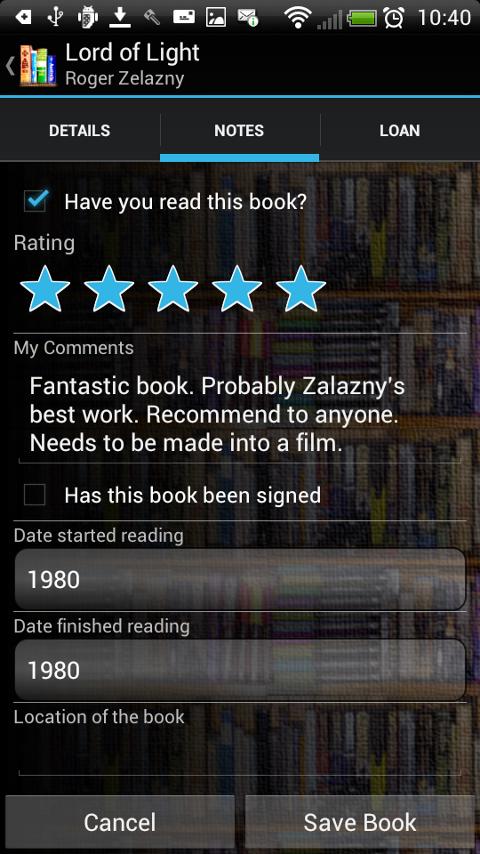
For those who like to keep track of how many books they read the app also lets you enter the date you began and finished reading the book. Even better, you can choose for your books to be sorted by date read so you can find all the books you read in 2015. Basically, within your bookshelves you can then sort books by even more options.
 | ||
| Image courtesy: Google Play |
Choosing a book to read is now so much easier because I can browse through books on my app instead of digging through my shelves. If you are wondering how many books the app can store I have not noticed a limit. I have nearly 600 recorded books read, about half that for "My Books" and smaller numbers for my other shelves (yes, it even displays how many books in each shelf!).
So, if you are looking for a handy, portable way to keep track of your books you should really consider downloading a book cataloging app, particularly Book Catalogue. It's free, has so many search and organizing options and it has not crashed once.
If anyone else has a different book cataloging app to recommend I would love to hear about it. Or any way for keeping track of books. My catalog is only going to get bigger! Happy organizing!

No comments:
Post a Comment